

Documentation
AI assistant connector (MCP)
Connect Claude, ChatGPT, Copilot, or another assistant and ask who was online, when, and for how long.
- Read-only
- On every plan
- Scoped to the person
- Revocable
- Audited
- How Presify worksSetup, permissions, reading timelines, flags
- AI assistant connector (MCP)Claude, ChatGPT, Microsoft Copilot
- API versioning policyPermanent paths, 90 days’ notice
On this page
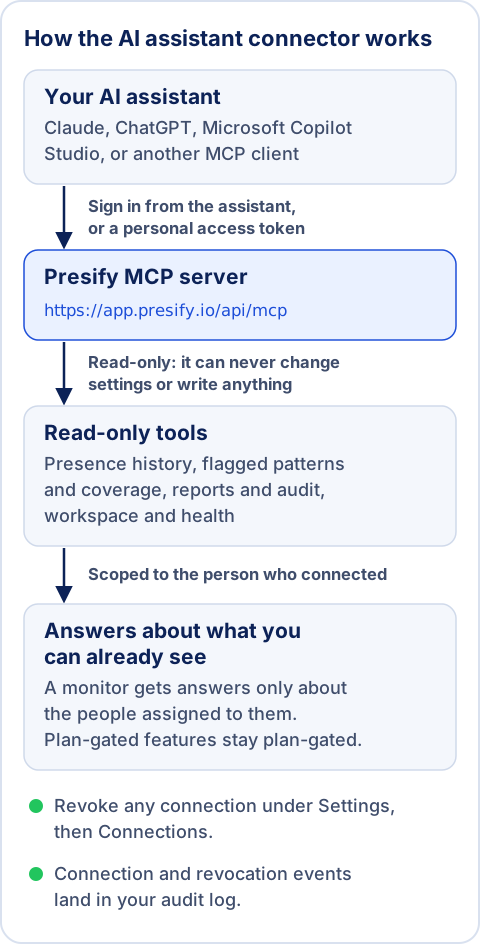
The connector lets an AI assistant answer questions from your Presify data over the Model Context Protocol (MCP). Ask who was online, when, and for how long, how online time is trending, and which presence patterns were flagged. It is included on every Presify plan and is read-only: an assistant can never change settings, enroll people, or write anything.
Answers are limited to what the connecting person can already see in Presify, so a monitor gets answers only about the people assigned to them. Plan-gated features stay plan-gated, and every connection can be revoked at any time under Settings, then Connections.
Two ways to connect
Sign in from the assistant (most people; no token)
Claude, ChatGPT, Microsoft Copilot Studio, Perplexity, and most other MCP clients connect with the server URL alone. Add Presify as a custom connector there, and the assistant walks you through a Microsoft sign-in and a Presify approval page. Nothing to copy besides the URL.
Lasts 90 days, then approve againPersonal access token (developer tools)
Claude Code, scripts, and the Anthropic API authenticate with a bearer token instead. Create one under Settings, then Connections; it is shown once, acts as you, and expires after a year. Each person can create up to 10 tokens a day.
Expires after 1 year
The server URL for both is shown on Settings, then Connections. On the production app it is:
https://app.presify.io/api/mcpSet it up per assistant
Claude (web, desktop, mobile)
- Settings, then Connectors, then "Add custom connector".
- Name it Presify, paste the server URL, select Add.
- Then sign in and approve.
On Team and Enterprise plans an org owner may need to enable it for members first.
Claude Code
- Create a personal access token under Settings, then Connections.
- Then run:
claude mcp add --transport http presify https://app.presify.io/api/mcp --header "Authorization: Bearer YOUR_TOKEN"Replace YOUR_TOKEN with the token. It is shown once, acts as you, and expires after a year.
ChatGPT
- Enable developer mode under Settings, then Apps, then Advanced settings.
- Add a custom connector with the server URL and OAuth.
- Then approve.
On Business, Enterprise, and Edu plans a workspace admin enables custom connectors first.
Microsoft Copilot Studio
- In your agent: Tools, then Add a tool, then New tool, then Model Context Protocol.
- Use the server URL with OAuth 2.0 and dynamic discovery.
Your Power Platform data policies apply.
Other MCP clients (Perplexity, Mistral, Cursor, VS Code, and more)
- Anywhere a custom MCP connector is supported, paste the server URL and complete the sign-in.
- Or use a personal access token where only headers are supported.
What your assistant can answer
- Presence history: a person’s day timeline (ordered presence segments with local times) and online time and presence summaries over any range. It also covers per-person statistics, side-by-side comparisons, the monitored roster, and who is online now (the latest sampled reading).
- Flagged patterns and coverage: presence patterns worth a closer look and the team coverage grid, on plans that include them.
- Reports and audit: generated reports with short-lived download links, report schedules, and the audit trail for owners.
- Workspace and health: plan and seat usage, Microsoft 365 connection health, recent notices.
Try a question:
How many hours a day was my team online the week of May 18?
Presify ·get_presence_summary ·read-only
Spread over the 5 tracked days, that averages about 7.3h a day per person (Marcus 7.0h, Priya 7.3h, Sofia 7.5h).
Presence is polling-sampled activity data: a directional read on when people are online and how much, not a measure of their work. Treat a flagged pattern as a starting point for a conversation, never as a conclusion about a person.
The read-only tools behind those answers
get_Person day timelineuser_ timeline get_Presence summarypresence_ summary get_Person deep statsuser_ stats get_Person overviewuser compare_Compare peopleusers list_Monitored peoplemonitored_ users get_Who is online nowcurrent_ presence list_Flagged presence patternsanomalies get_Flagged-pattern summaryanomaly_ summary get_Team coverage gridcoverage list_Generated reportsreports get_Report download linkreport_ download list_Scheduled reportsscheduled_ reports list_Audit trailaudit_ events get_Workspace overviewworkspace_ info get_Microsoft 365 connection healthconnection_ health list_Workspace noticesnotifications searchSearch this workspacefetchFetch a search result
weekly_presence_reviewuser_deep_diveconnection_checkup
The tool list adapts per person and per plan: flags, coverage and the audit trail appear only where your plan and role include them.
Security and revocation
- Connecting always shows who is connecting what, to which workspace, before anything flows.
- The approval screen names the address that receives access. Claude, ChatGPT, and Microsoft Copilot show as verified, and an app on your own computer shows as such.
- Any other app is marked unverified and needs one extra confirmation, because anyone can register an app under any name. An app that publishes its details at a web address also shows that address’s host: that tells you who published the details, not whether the app is safe.
- The Approve button turns on a moment after the approval screen is in front of you, so a click meant for another window cannot approve a connection.
- Approve only a connection you started yourself. If someone sends you a Presify approval link, choose Deny.
- Tokens are stored only as hashes and expire on their own; revoking a connection (or removing a member) cuts access immediately.
- A connection made by signing in from the assistant lasts 90 days from your approval, then the assistant asks you to approve again. Connections and personal access tokens also stop working, usually within an hour, once their owner’s Microsoft account is disabled or deleted.
- Connection and revocation events land in your audit log, and so does every report file downloaded through an assistant. Owners and admins can see and revoke every connection in the workspace.
- The workspace owner and admins get an email whenever a new connection or personal access token is created, and whenever an existing connection is approved again for an unverified address. Settings, then Connections, shows the address each connection sends data to.
- Answers go to the AI provider you connected, under that provider’s terms. Connect only providers your organization has approved.
Troubleshooting
The connection was revoked or expired (assistant sign-ins last 90 days). Reconnect from the assistant, or create a fresh token.
The connector is paused for maintenance. Connections are kept; service resumes without reconnecting.
Your role or plan does not include them. The tool list adapts per person and per plan.
For developers and agents
Presify is a standard MCP server behind OAuth 2.0 (authorization code with PKCE, dynamic client registration). Everything a client needs is discoverable:
- MCP endpoint
POST only. Stateless Streamable HTTP with JSON responses; Bearer token from the OAuth flow or a personal access token. initialize, ping, and the public documentation resources (resources/list, resources/read) need no token; every tool is read-only.
https://app.presify.io/api/mcp - MCP server card
Pre-connection discovery: server URL, transport, protocol revision, OAuth details, and the full read-only tool catalog with input schemas.
- OAuth 2.0 authorization server metadata (RFC 8414)
Endpoints, grant types (authorization_code, refresh_token), PKCE S256, open dynamic client registration (RFC 7591), and OAuth Client ID Metadata Documents.
- Protected resource metadata (RFC 9728)
Names the resource, its authorization server, and the single read-only scope. The 401 challenge from the endpoint points here.
- OpenAPI 3.1 description
The whole public machine surface, with the current MCP tool catalog under x-mcp.
- API versioning and deprecation policy
Permanent paths, protocol-revision negotiation, and Deprecation plus Sunset headers at least 90 days before any removal. Read the policy.
- Site index for AI assistants (llms.txt)
What Presify is, when to use it, and how an agent calls it.
Ask your assistant about the whole day.
The connector is on every plan, read-only and scoped to your own sign-in. Connect Microsoft first, then your assistant.